
Signing Official Guide
Learn the two ways Signing Officials can authorize researchers to submit Data Access Requests in DUOS
Summary: DACs set the paradigm requiring either Signing Official review of each DAR, or a single pre-authorization of a researcher to submit DARs to their DAC.
Overview
When a researcher makes a data access request (DAR), they are required to obtain approval from two sources:
- The dataset’s Data Access Committee, which oversees the data.
- Their home institution’s Signing Official, who approves their request and acknowledges the acceptance of organizational liability in the case of data misuse by way of signing a data access agreement (DAA).
Historically, DARs follow this sequence:
- The Researcher prepares and submits the DAR
- The Signing Official reviews and approves the DAR and corresponding DAA.
- The Data Access Committee reviews and approves the DAR.
Some DACs in DUOS use this traditional flow that requires Signing Officials to review and approve each DAR.
DUOS also enables DACs to use a novel flow DAAs whereby Signing Officials pre-authorize researchers to submit DARs to a DAC until the Signing Official revokes the privilege. This significantly reduces the administrative burden on Signing Officials and expedites researchers’ access data.
Getting Started: Onboarding to DUOS as a Signing Official
- Please register in DUOS with your institutional email account here: https://duos.org/.
Note: DUOS requires a Microsoft or Google-backed account to register. If your institutional email is not either of these accounts, you can make it a Google-backed account by following these instructions.
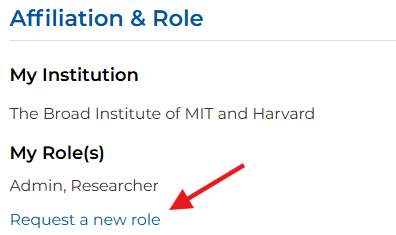
- On the Your Profile page under Affiliation and Role, select “Request a New Role” and select to request the Signing Official role. Please link at least two external profiles to allow our team to efficiently verify your role. This will automatically create a support ticket with the DUOS user support team and a member of the team will reach out to you to let you know if you have been approved or if more information is needed.
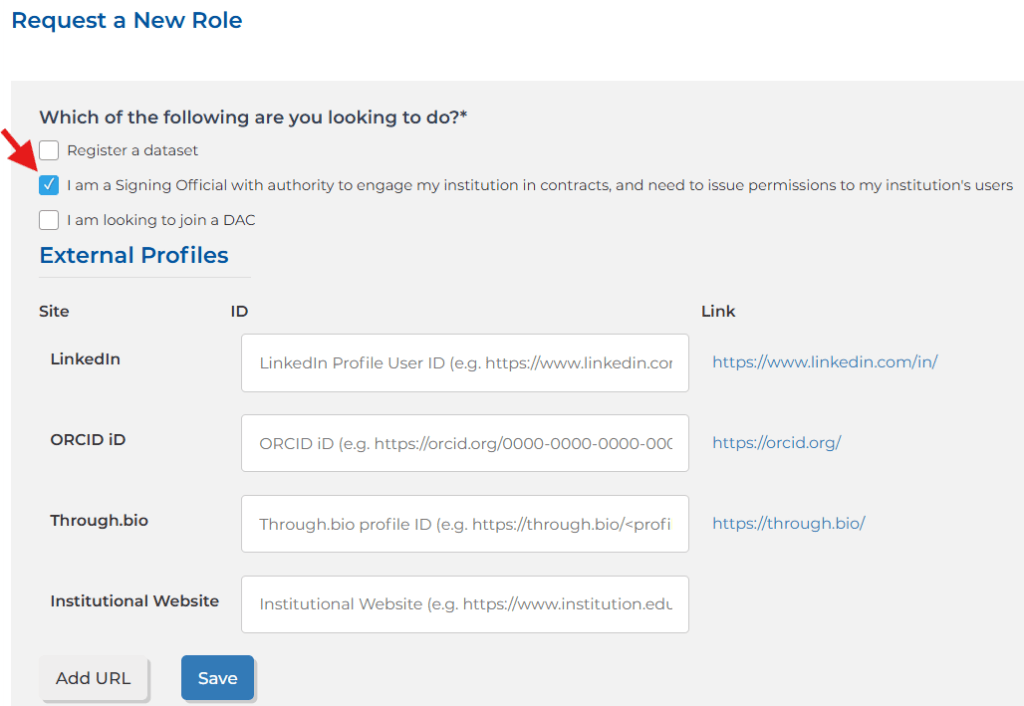
- Once you have been approved as a Signing Official, you will then be able to view your SO Console when you log in to DUOS. This is where you can see your institution’s researchers and issue them permissions.
How to Approve DARs submitted to DACs under the Historical Per-DAR SO Review Paradigm
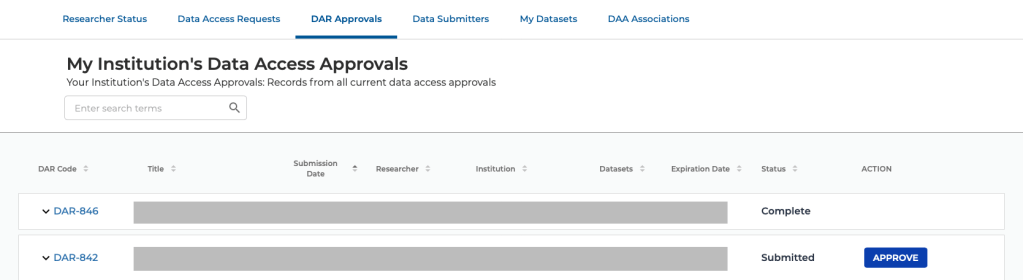
DACs in DUOS have the option to require Signing Officials to approve each individual DAR submitted by their researchers. If this is the case for a DAR submitted by one of your institution’s researchers, you will see it on the DAR Approvals tab. If a DAR is awaiting approval, you will see a blue “Approve” button next to it.
Pre-Authorizing Your Researchers to Request Access from DACs using the Novel Flow
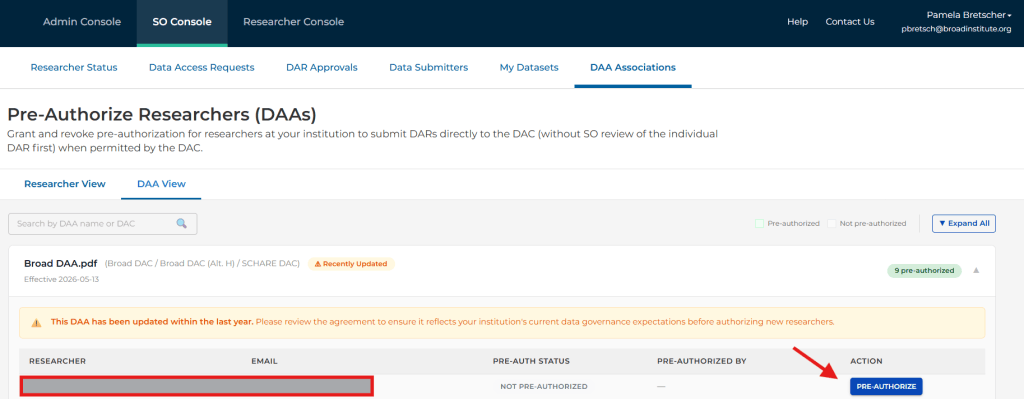
On the DAA Associations tab, you can pre-authorize researchers under individual DAAs for DACs in DUOS. This allows a researcher to submit DARs for any datasets managed by that DAC.
Need an Emergency Brake for Researcher Access to Data?
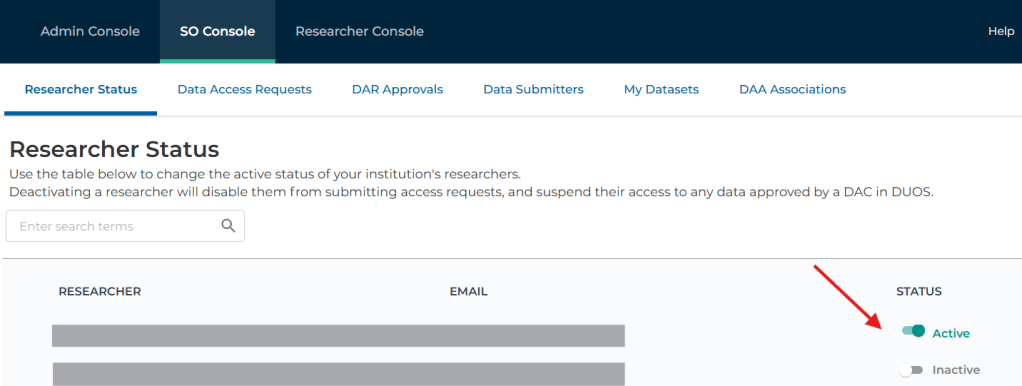
DUOS lets Signing Officials immediately suspend a researcher’s data access requests and their ability to set further access requests via the Researcher Status functionality. On the Researcher Status tab, you will see a list of all of the researchers registered under your institution in DUOS. Researchers automatically become active in your institution when they log into DUOS with a valid email address from your institution.
Why offer pre-authorization Data Access Agreements?
In current practice, SOs must review and approve thousands of DARs per year – estimates from the NIH show that Signing Officials were required to approve over 90,000 DARs in 2024, just for NIH data (stats). Based on feedback from numerous SOs, we understand that SOs are primarily assessing the individual researcher, rather than the proposed research.
To alleviate this burden on SOs, DUOS allows DACs to operate under a model that gives SOs the opportunity to pre-authorize researchers to submit DARs to DACs using DUOS by approving researchers under the DAC’s Data Access Agreement (DAA). This removes the need for SOs to review every DAR, and instead only approve each individual researcher to submit DARs once, and remove that approval at any time. Looking at the NIH data again, only 9,000 researchers made those 90,000, which means this pre-authorization model would reduce administrative burden (and delays!) on over 80,000 DARs per year!
How to Create a Google Account with a Non-Google Email
The DUOS platform requires a Google account: either a Gmail account, an institutional Google Apps account, or a Google Apps account that you create. If your institution uses G Suite, your account will already be a Google account and you can proceed directly to register in DUOS. If not, you can follow these steps to create a Google account that is associated with your non-Gmail, institutional email address.
See How to Register in DUOS with your Institutional (non-Gmail) Email Account for step-by-step instructions.
 DUOS Blog