
Signing Official Guide
DUOS for Signing Officials
See How to pre-authorise researchers to submit Data Access Requests (DARs)
DUOS Resources for Signing Officials
About Library Card Agreements
Currently, when a researcher makes a data access request (DAR), they are required to obtain approval from two sources:
- The dataset’s Data Access Committee (DAC), which oversees the data
- Their home institution’s Signing Official (SO), who approves their request and acknowledges the acceptance of organizational liability in the case of data misuse
SOs see many DARs: estimates show that Signing Officials were required to approve at least 50,000 DARs in 2019 in the US. Based on feedback from numerous SOs, we understand that SOs are primarily assessing the individual researcher, rather than the proposed research.
To alleviate this burden on SOs, DUOS is offering SOs the opportunity to pre-authorize researchers to submit DARs to DACs using DUOS, via our DUOS Library Card Agreement. Approved researchers will be pre-authorized for a 1-year renewable term.
To Issue Library Cards to your Researchers:
- Please register in DUOS with your individual institutional email here: https://duos.org/
- Complete your user profile, including your institution.
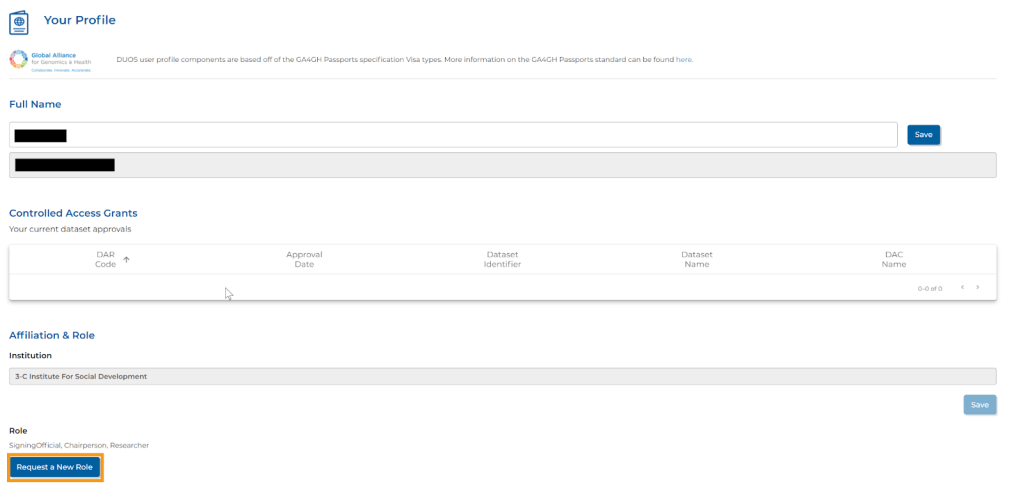
- Click on the blue “Request a New Role” button on the Your Profile page.
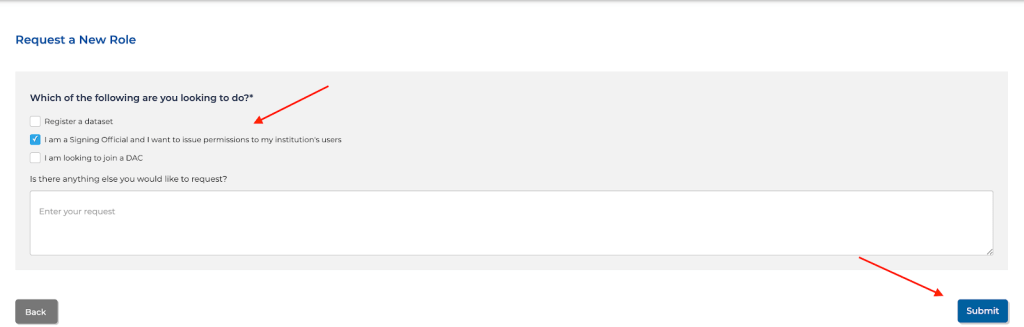
- In the menu that appears, select the box labeled “I am a Signing Official and I want to issue permissions to my institution’s users.”
Once you have completed your profile, the DUOS team will reach out to you to verify your identity. Once you are approved, you will then be able to view your Signing Official Console where you can issue Library Card Agreements to researchers from your institution.
Please note, this agreement is non-negotiable.
Signing Official FAQs
🧾See the Terra Support article here.
Frequently Asked Questions Pertaining to Signing Officials
What is a Library Card?
A Library Card is a type of data access agreement that allows an institutional Signing Official to pre-authorize researchers to submit data access requests directly to a specified data access committee without further review by the Signing Official, expediting the Data Access Request’s turnaround time.
More information on Library Cards is included in the How to pre-authorize researchers to submit Data Access Requests in DUOS doc.
How do I issue or remove a Library Card for one of my researchers?
In order to start this process, please register in DUOS on the DUOS homepage and complete your user profile, selecting that you are a Signing Official. The DUOS team will then reach out to you to grant you Signing Official permissions and help you issue Library Cards to your researchers.
See How to pre-authorize researchers to submit Data Access Requests in DUOS for step-by-step instructions.
How to Create a Google Account with a Non-Google Email
The DUOS platform requires a Google account: either a Gmail account, an institutional Google Apps account, or a Google Apps account that you create. If your institution uses G Suite, your account will already be a Google account and you can proceed directly to register in DUOS. If not, you can follow these steps to create a Google account that is associated with your non-Gmail, institutional email address.
See How to Register in DUOS with your Institutional (non-Gmail) Email Account for step-by-step instructions.
 DUOS Blog