
Researcher Guide
DUOS for Researchers
How DUOS is Helping Researchers
Making sure researchers can access the right data, right away.
Currently, researchers submit over 100,000 data access requests per year to data access committees across the globe. With the number of researchers, research tools, and genomic data rapidly increasing, the number of data requests and the demand on data access committees is becoming unmanageable. This leads to slow turnaround times for researchers on their data access requests, delaying research and potential advancements.
DUOS aims to solve this problem by creating a single interface by which researchers can submit requests to multiple DACs around the world, instead of going through a unique process for each data access committee. With DUOS’ additional tools for data access committees (Library Card Agreements and DUOS’ matching algorithm), DUOS is rapidly decreasing the turnaround time to help researchers access more data, faster, and with less effort.
Researcher FAQs
Frequently Asked Questions Pertaining to Researchers in DUOS
How do I make a data access request in DUOS?
If you have not yet registered with DUOS, please make sure to do so via the DUOS homepage. Once registered, you can proceed to the DUOS Data Library to search for and identify the datasets you would like to request, then select them and click the ‘Apply for Access’ button. You will then be taken to the Data Access Request Application workflow in DUOS. Please fill out the form as directed and click ‘Submit’ when finished. You will be able to monitor the status of your DAR via your Researcher Console page.
Do I have to have a signed Library Card Agreement to make a data access request?
Yes, you must have a Library Card Agreement before you can submit a data access request.
To obtain a Library Card, please first have your Signing Official log in to DUOS (https://duos.org/) and complete their profile. Then, please have them email support@duos.org with the following:
- The name of their institution
- Their title at this institution
- A statement confirming they have the authority to engage the institution in legal contracts
Do I have to be a PI to apply for access to data via DUOS?
Each institutions’ Signing Official(s) are responsible for evaluating researchers’ eligibility to receive a Library Card and submit data access requests. Without this pre-authorization from a Signing Official, a researcher will not be able to submit a DAR.
Do I need an RAS account to apply for access, and how do I get one?
Yes, you must have a RAS account in order to request access to data via DUOS. If you do not have an RAS account and would like to obtain one please follow the NIH instructions here: https://datascience.nih.gov/researcher-auth-service-initiative#about.
How long will it take for my data access request to be approved?
Each DAC in DUOS is self-managed, meaning researchers may experience different average turnaround times from each DAC. DUOS’ aim is to decrease turnaround time as much as possible while ensuring a thorough DAR review.
If I am approved for access, where and how do I access the data?
Each DAC may store its data in different locations, however much of the data accessible via DUOS is available in Terra. Access to data is provided by the individual data custodian for each dataset. If the data custodian has not reached out to you within 24 hours of approval of your DAR, please reach out directly to the data custodian listed in the DUOS Data Library.
For questions or issues on accessing data via Terra please see the Terra support documentation, or reach out to the support team directly at support@terra.bio
How do I grant access to my lab staff after being approved for access to data?
If you would like to add members of your lab staff to a dataset you have been approved for, please reach out directly to the data custodian for the dataset. Keep in mind that any additional PIs or individuals from external teams/institutions will need to submit their own DAR to access the data.
I have accessed the data I was approved for, but I believe there is an issue with it (ex. missing or incorrectly formatted data). What should I do?
Please contact the Data Custodian listed for the dataset(s) in the DUOS Dataset Library.
Why was my data access request denied?
Most often, this occurs when the proposed research is not permitted by the data use limitations on the dataset(s). Please note that each DAC in DUOS is self-managed and DUOS is not permitted to share results or comments with researchers beyond what is provided to the researcher by the DAC. In the near future, DACs will have the option of providing comments to the researcher when conveying a DAR decision.
I am a member of the same institution which manages access to a dataset. Do I still need to submit a data access request?
This varies by institution. We suggest that you reach out to the internal colleagues who are the Data Custodians for the dataset(s) and/or your institution’s Signing Official to determine the answer to this question.
How to Register in DUOS With Your Institutional (non-Gmail) Email Account
The DUOS platform requires a Google account: either a Gmail account, an institutional Google Apps account, or a Google Apps account that you create. If your institution uses G Suite, your account will already be a Google account and you can proceed directly to register in DUOS. If not, you can follow these steps to create a Google account that is associated with your non-Gmail, institutional email address.
Do not use account aliases. Setting up an alias connection between your non-Google account and a Google account will result in account issues and erratic behavior when using the platform. Please do not use accounts with alias connections for DUOS!
Step-by-step instructions
Creating a Google account with a non-Google email address using the steps below is the supported method of using a non-Google account with Terra.
1. Go to the Google sign-up page (https://accounts.google.com/SignUp). When prompted, fill in your name and other required information (such as your birthdate).
2. When you see the option to use your existing email, select it.
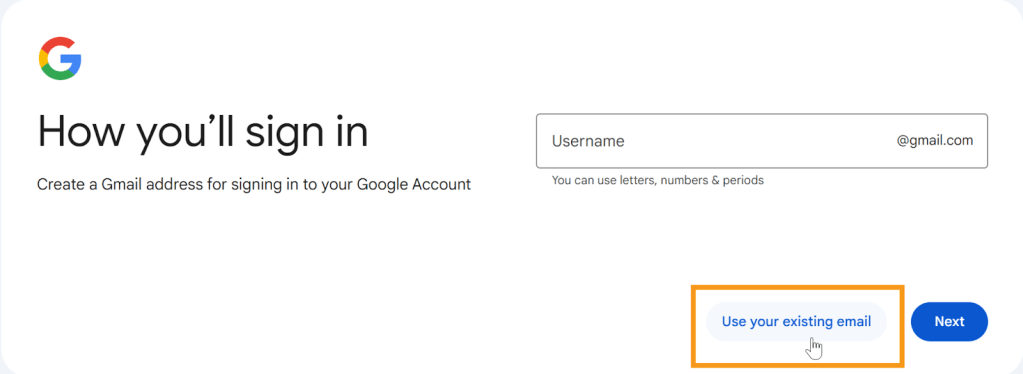
3. Enter your individual institutional email for your DUOS account in the email address box.
4. Follow the prompts to complete your Google account setup. Once you’ve set up the new account, you’ll be able to register on the DUOS homepage with that email address.
 DUOS Blog